A Bible app for iPhone

Read the Bible.
Explore its world.

A quieter way to read Scripture, discover the places and history behind its words, and connect with others—at your own pace.

In final testing through Apple’s TestFlight. The public release is being prepared.

IRead

Scripture without the noise.

A calm, carefully made reading experience that makes it easier to spend meaningful time with the Bible.

One verse at a time, set on a page you can read comfortably. The app keeps your place, keeps your notes on your phone, and lets you look into a word, a place or a cross reference without losing where you were.

105Thy word is a lamp unto my feet, and a light unto my path.

Psalm 119:105 · King James Version
  • Three translations, built inThe King James Version with Strong’s numbers, the Berean Standard Bible and the American Standard Version, all on the phone. Reading never needs a connection.
  • Word study where you areTap a Strong’s number for Hebrew and Greek definitions from Strong’s, Thayer’s and Brown-Driver-Briggs, with an original-language strip under the verse.
  • Cross references and searchUp to ten related passages per verse from the Treasury of Scripture Knowledge, and search across verses, places, topics and Strong’s numbers.
  • Your place is keptReading position, chapters read, saved verses and notes stay on your iPhone, in the app’s own database.
  • The page is yoursReader themes with a Page Tone control, serif or sans type, text size, line spacing, verse numbers, and a Focus Reading mode that hides everything but the Word.
  • Explore without losing your placeOpen a place or a related passage from the verse you are reading, then return to it with one tap.
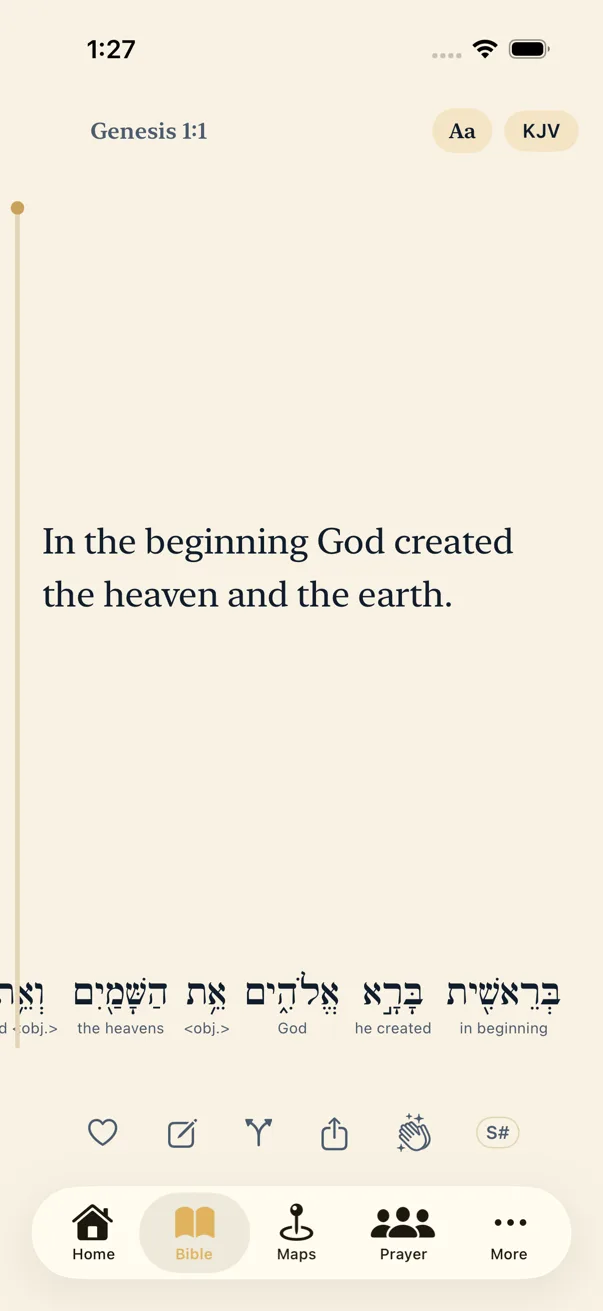
The Journey Scroll reader showing Genesis 1:1 in the King James Version on a parchment page, with the Hebrew words beneath
The reader in the current TestFlight build, Parchment theme. The Slate & Stone appearance shown on this site is in design.

IIExplore

Journey Lens In development

There’s more behind the words.

What if there was more to the story? Journey Lens connects a passage with the places, the history, the archaeology and the other passages that give it depth.

Why does Acts begin calling Saul “Paul”?

Acts 13:9 gives both names in one breath: “Saul, (who also is called Paul).” Nothing in the passage says he was renamed; like many Jews of the Roman world he carried a Hebrew name and a Roman one. What changes is Luke’s usage. From this verse on the narrator says Paul, and “Saul” is heard again only when Paul retells the Damascus road. The shift comes just as his work turns toward the Gentile, Roman world.

Acts 13:6–12 · Interpretive connection

Paying attention to a detail like that is the whole idea. Every statement in Journey Lens carries a label: From Scripture, Established, Traditional identification, Interpretive connection or Debated, so you always know what the text says, what archaeology has shown, and what remains an open question.

  • A synagogue with layers of history

    Capernaum is not a lost town. It is Tell Hum on the north-west shore of the Sea of Galilee. The limestone synagogue visitors see was built centuries after Jesus; whether the basalt foundation beneath it belonged to the synagogue of Mark 1 is debated.

    Established Debated
  • Two processions at the gate

    Luke tells the raising of the widow’s son at Nain in the words of 1 Kings 17. Jesus “delivered him to his mother,” as Elijah had at Zarephath, and the crowd says what the echo invites: a great prophet is risen up among us.

    Interpretive connection
Aerial view of the excavated ruins at Tell Hum, identified with Capernaum: a white limestone synagogue among dark basalt house walls beside the Sea of Galilee
Tell Hum, identified with Capernaum, from the air. The white limestone synagogue is from the fourth or fifth century, long after the events of Mark 1; the dark basalt walls around it are the remains of the first-century town. Photograph by AVRAMGR, Wikimedia Commons, CC BY-SA 4.0.

Status Journey Lens is in development for a future release and is not in the current TestFlight build. The atlas it grows from is in the app today: 96 biblical places with their verses, photographs and history, and two guided journeys, Jesus’ ministry in Galilee and Paul’s first missionary journey.

IIIConnect

Journey Together

Some journeys are better shared.

The quiet, private side of the app: prayer you keep, prayer you share with people you trust, and Scripture you pass along.

  • Private by defaultA prayer request lives on your phone until you choose to share it. Nothing leaves the device on its own.
  • Text a prayer chainPick the people you trust once, then send a request or a verse through Messages. You see every word before it goes.
  • Small groups, by invitationSign in with Apple, start a group and invite people with a link or a QR code. Share a request with the whole group or only its leaders, say “I prayed,” post praise, and keep notes between meetings.
  • Share a passageSend any verse or passage as a card or a link, with its translation, to anyone, whether or not they have the app.

No feeds, no followers, no public posts. Groups are the one feature that uses a server; everything else works on the phone with nothing sent anywhere. The privacy policy describes exactly what Groups stores.

Appearance

A reading experience that feels like yours.

Warm and literary, strikingly minimal, or quietly dark. Choose the appearance that helps you focus on the words.

  • In the beginning was the Word, and the Word was with God, and the Word was God.John 1:1 · KJV

    Slate & StoneSignature

  • In the beginning was the Word, and the Word was with God, and the Word was God.John 1:1 · KJV

    Monochrome LightEditorial

  • In the beginning was the Word, and the Word was with God, and the Word was God.John 1:1 · KJV

    Monochrome DarkLow light

Design previews. These three appearances belong to the redesigned app and are not in the current TestFlight build, which offers Parchment, Midnight, Classic and Focus Black reader themes with a Page Tone control.

Your journey. Your pace.

Begin simply. Read when you can; the app keeps your place. Curiosity is the invitation, and Scripture provides the depth.

  1. Read a verseOne verse, well set, is enough to begin.
  2. Read a chapterTurn pages with a swipe; your place is saved.
  3. Explore a questionOpen a place or a cross reference, then come back.
  4. Connect when you’re readyKeep prayer close, or share it with people you trust.

App availability

Being prepared for public release.

Journey Scroll is an iPhone app in its final round of testing through Apple’s TestFlight. There is no public download yet, and no release date to announce.

Want to know when it launches?

Send a short email and a real person will reply when the app is live. No mailing list, no newsletter, nothing automated.

Requires an iPhone running iOS 18 or later. There is no Android or web version today. When the app is on the App Store, this page will say so.